Introduction to Pentora
What is Pentora?
Pentora is a modular, high-performance security scanner that rapidly discovers network services, captures banners, and maps findings into vulnerability intelligence. Built with a powerful DAG-based execution engine, Pentora enables security teams to perform comprehensive network assessments with precision and efficiency.
What Makes Pentora Special?
Lightning Fast
Efficiently discover live hosts using ICMP/ARP/TCP probes with intelligent rate limiting
Accurate
Protocol-specific probes with layered fingerprinting and confidence scoring
Modular
Extensible plugin system for custom scanning logic and integrations
Key Capabilities
🔍 Fast Network Discovery
Efficiently discover live hosts using ICMP/ARP/TCP probes
🎯 Advanced Port Scanning
TCP/UDP scanning with intelligent rate limiting and retry logic
🔬 Layered Fingerprinting
Protocol-specific probes that accurately identify services and versions
🛡️ Vulnerability Intelligence
Match detected services against CVE databases and misconfigurations
✅ Compliance Assessment
Built-in support for CIS, PCI-DSS, and NIST compliance frameworks
🧩 Modular Architecture
Extensible plugin system for custom scanning logic
💾 Workspace Management
Persistent storage for scan history, results, and analytics
Who Should Use Pentora?
🔐 Security Professionals
Technical operators who need powerful CLI tools for network assessments, penetration testing, and security audits.
⚙️ DevSecOps Teams
Teams integrating security scanning into CI/CD pipelines with automated vulnerability detection.
📋 Compliance Officers
Organizations requiring regular compliance scans against industry standards (CIS, PCI-DSS, NIST).
🏢 Enterprise Security Teams
Large organizations needing distributed scanning, multi-tenant workspaces, and SIEM/SOAR integrations.
Core Philosophy
Design Principles - Pentora is built on five core principles:
- 🧩 Modularity: Every scan phase is a composable module in a directed acyclic graph (DAG)
- ⚡ Performance: Concurrent execution with intelligent rate limiting
- 🎯 Accuracy: Layered fingerprinting with confidence scoring
- 🔄 Flexibility: Both stateless (Nmap-style) and workspace-backed operations
- 📊 Transparency: Structured logging and comprehensive audit trails
Key Features
✅ Open Source Core
- ✓CLI-based scanning with full pipeline control
- ✓Asset discovery and port scanning
- ✓Service fingerprinting with extensible probe system
- ✓Vulnerability evaluation against CVE databases
- ✓Workspace for scan history and result storage
- ✓JSON/CSV/PDF export formats
- ✓Hook system for custom integrations
🔒 Enterprise Edition
- ★Distributed scanning across worker pools
- ★Multi-tenant workspace isolation
- ★Role-based access control (RBAC) and SSO
- ★Advanced compliance packs (CIS/PCI/NIST)
- ★SIEM/SOAR integrations (Splunk, QRadar, Sentinel)
- ★Ticketing system integration (Jira, ServiceNow)
- ★Web portal with dashboards and scheduling
- ★Air-gapped deployment support
- ★License-managed plugin marketplace
Quick Start
curl -sSL https://pentora.io/install.sh | bash
pentora scan 192.168.1.0/24
pentora scan 192.168.1.100 --vuln
pentora scan 192.168.1.0/24 --only-discover
pentora workspace list
Architecture Overview
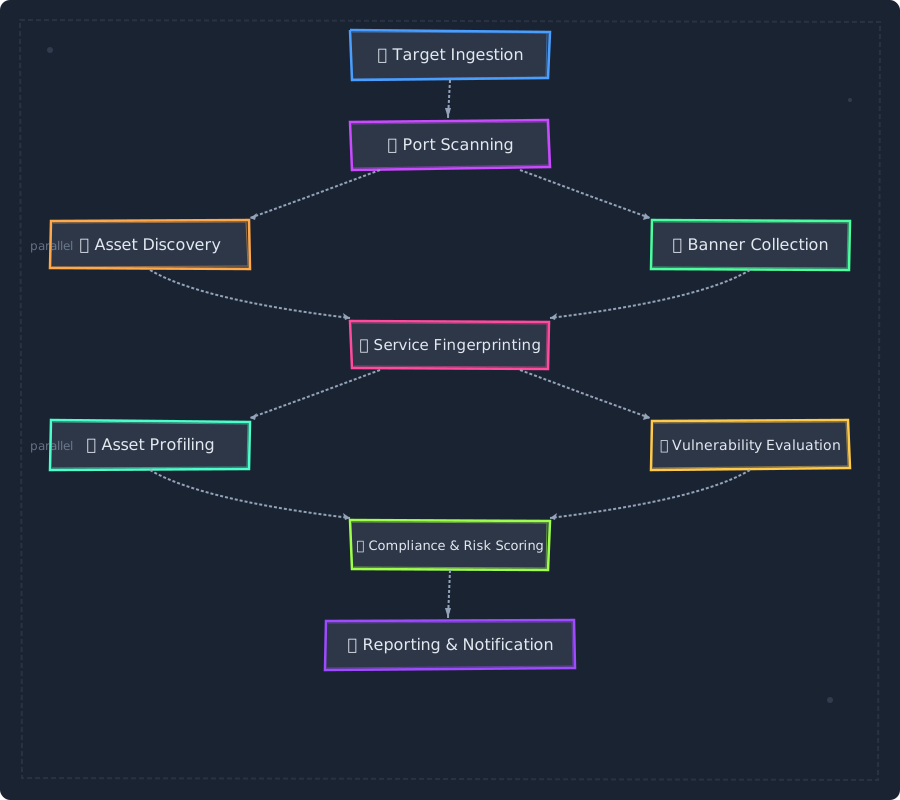
Pentora uses a DAG-based execution engine where each scan phase is represented as a node:
Module Types
🔧 Embedded
Built-in Go code for maximum performance
🔌 External
Isolated plugins via gRPC or WASM
✏️ Custom
User-defined modules for specific needs
Use Cases
🔍 Network Asset Discovery
Identify all active devices, open ports, and running services across your network infrastructure.
🛡️ Vulnerability Assessment
Detect vulnerable service versions, misconfigurations, and CVE matches before attackers do.
✅ Compliance Auditing
Generate compliance reports for PCI-DSS, CIS benchmarks, NIST frameworks, and custom policies.
📊 Continuous Monitoring
Schedule recurring scans and integrate with SIEM/ticketing systems for automated incident response.
👻 Shadow IT Detection
Discover unauthorized services, outdated software, and security policy violations.
Getting Started
Ready to dive in? Head over to the Installation Guide to install Pentora, or jump to the Quick Start Guide to run your first scan.
Community & Support
Note: Pentora is actively developed. Features marked with 🔒 are available in the Enterprise Edition. Check the Pricing Page for licensing options.